Architecture in detail
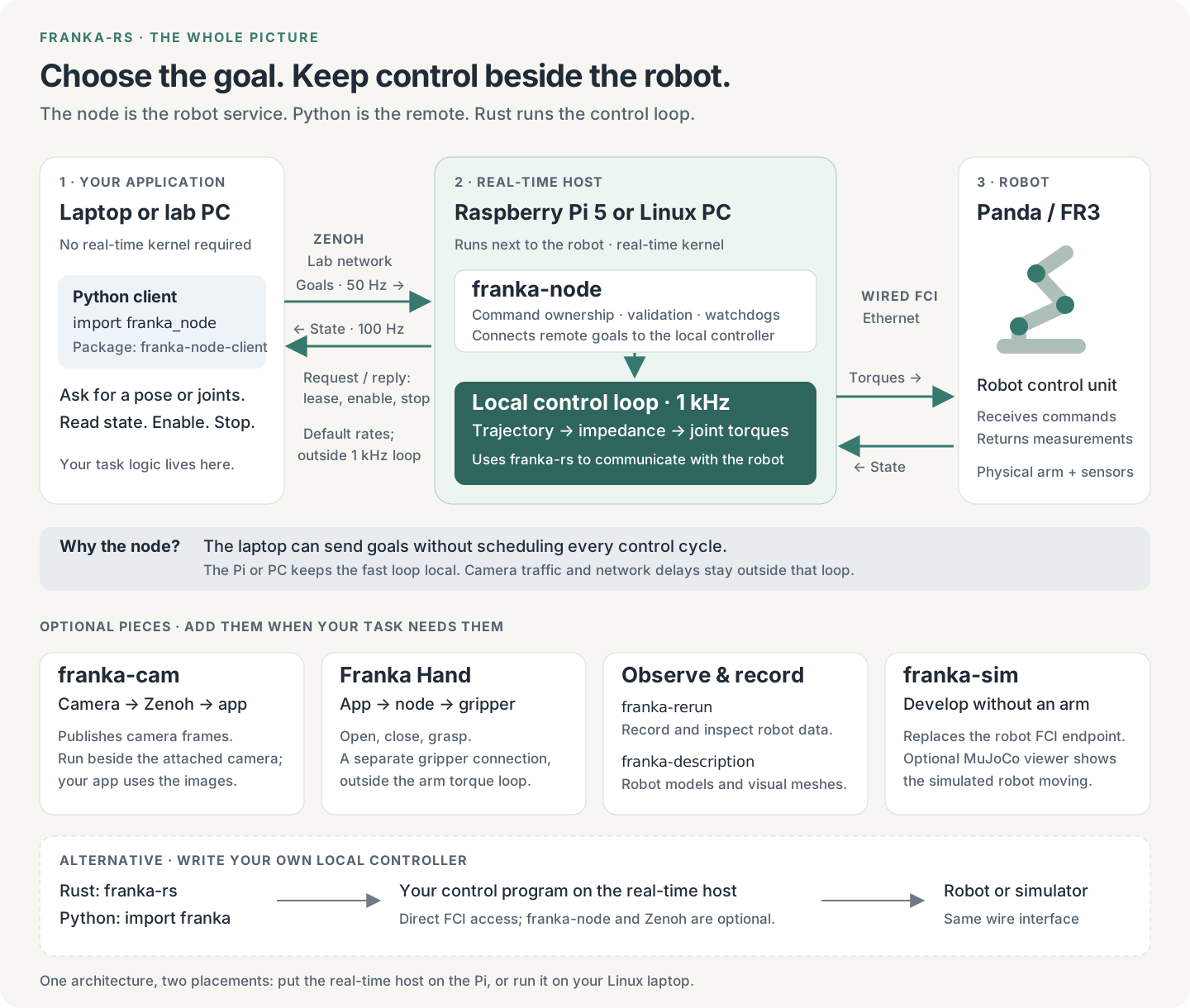
Your program chooses the goal. The machine beside the robot turns it into motion.
For the simplest application interface, run franka-node on a Pi 5 or realtime Linux PC
and use franka_node from Python. The same Python program works whether the node is on
that PC or across the network on a Pi.
Open or download the full diagram.
Follow one command
Suppose your Python program asks to move the hand up by 5 cm:
- Python sets a goal.
targets.move_by([0, 0, 0.05])returns immediately. Thefranka-node-clientbackground thread advances targets toward that goal, at 50 Hz by default. It handles the lease, message numbering and keepalive. - Zenoh delivers messages. Targets go to the node; measured state comes back at 100 Hz by default. Acquire, enable and stop use request/reply. A direct connection needs no separate Zenoh router.
- The node decides whether to accept each target. It checks the arm’s owner, target validity, step and lead bounds, joint goals and any configured workspace box. It handles sessions and watches for a disconnected or silent client.
- The Rust library makes continuous motion locally.
franka-rsgenerates a trajectory with velocity, acceleration and jerk limits and runs its impedance controller on a realtime thread. The node’s default backend sends joint torques at 1 kHz over wired FCI. - Python observes the result.
targets.wait(timeout=5.0)waits for the accepted goal and the measured pose to agree within the client’s tolerances. It is not an acknowledgement that every arbitrary goal is reachable.
The Python program does not send a torque every millisecond. Neither Python’s GIL nor Zenoh is on the 1 kHz path. On a Panda, the FCI v5 command also carries the required zero joint-velocity motion-generator field alongside the external torques; this is still torque control (Panda specifics).
Why each piece exists
| Piece | Its job | Do I install it? |
|---|---|---|
franka-node | Own the robot connection, manage sessions and run control beside the arm | Yes, on the control host for the node setup |
franka-node-client / import franka_node | Turn Python goals into a paced target stream; manage access and read state | Yes, where your application runs |
| Zenoh | Carry goals, state and requests between application and node | Included as dependencies; no separate router for a direct connection |
franka-rs | Speak FCI, calculate the model, generate trajectories and torques | Already compiled into the node |
franka-py / pip install franka-rs / import franka | Use that library directly inside a Python process | An alternative to the node client; not required with it |
| Franka Hand | Grasp objects through its separate connection, exposed by the node when configured | Optional hardware; built-in node driver |
franka-cam | Capture camera frames and publish them over Zenoh | Optional separate process near the cameras |
franka-rerun | Record and replay motion; node recording is a build feature | Optional; the Rerun viewer opens recordings |
franka-description | Supply robot meshes for visualization | Dependency of visualization tools, not a controller |
franka-sim | Replace the robot’s FCI endpoint for development | Optional separate simulator, with an optional MuJoCo desktop viewer |
The simulator’s MuJoCo viewer shows a simulated robot. Rerun shows live or recorded data. They are different viewers with different jobs. See simulation with visualization and recording.
Pi or laptop: the same interface
| Layout | Where Python runs | Where the node and 1 kHz loop run | Python endpoint |
|---|---|---|---|
| Pi beside the robot | Your ordinary laptop or workstation | Pi 5 with realtime Linux, wired to robot | tcp/<pi-address>:7447 |
| One computer | The same Linux PC | That PC with realtime Linux, wired to robot | tcp/127.0.0.1:7447 |
| Try without hardware | Your development machine | Linux host alongside the simulator; realtime enforcement can be disabled for simulation | Localhost or the Linux host’s address |
An ordinary macOS or Windows laptop can be the remote client, not the realtime control host. Moving the node from a PC to a Pi changes the endpoint, not your application’s control logic. One node can serve multiple arms, each with its own loop; that alone does not make the arms’ motions synchronized or collision-aware.
Use the direct Rust library for your own 1 kHz callback or observer. Use import franka
for high-level Python target control inside a local process; it does not expose Python
callbacks at 1 kHz. Both run on the realtime machine and bypass the node and Zenoh.
For an application that just sends goals, the node offers a consistent interface for both layouts.
Start it today
These install from a checkout; cargo install franka-node --locked and pip install franka-node-client
of one release do the same.
A real robot first needs the realtime host, wired network and FCI
mode prepared. The Pi guide walks through that one-time setup.
On the control host:
cargo install --path crates/franka-node --locked
Create node.toml before starting:
name = "controller"

[zenoh]
listen = ["tcp/0.0.0.0:7447"]
multicast_scouting = false

[[arm]]
name = "arm"
host = "172.16.0.2"
realtime = "enforce"
Use the robot’s actual address. Plain TCP here assumes a trusted network. For simulation,
use the simulator host (usually 127.0.0.1) and realtime = "ignore"; keep enforcement on
for a physical arm. Start the node after saving the configuration:
franka-node node.toml
This connects and publishes state; it does not start motion.
On the application machine, inside a Python virtual environment:
python -m pip install ./crates/franka-node/python
Read state first, without acquiring control or moving the robot:
import franka_node

with franka_node.Node("tcp/<control-host>:7447") as node:
    print(node.arm("arm").state().position)
The following example moves the robot up by 5 cm. Run it only with that path clear and the robot ready for motion, as described in the first-motion guide.
import franka_node

with franka_node.Node("tcp/<control-host>:7447") as node:
    with node.arm("arm") as arm:
        with arm.cartesian_targets() as targets:
            targets.move_by([0.0, 0.0, 0.05])
            targets.wait(timeout=5.0)
Leaving the contexts stops the session and releases access. Once the host is provisioned, run the node as a service: everyday use then means opening your Python application, not rebuilding Rust or starting a router.
What is published?
From 0.4.0 one version covers everything a release publishes:
| Where | What |
|---|---|
| crates.io | franka-rs, franka-description, franka-rerun, franka-node, franka-cam |
| PyPI | franka-rs (direct Python bindings), franka-node-client, franka-vr-teleop |
| GitHub release | prebuilt franka-node and franka-cam tarballs for the Pi (aarch64) and x86_64 Linux |
Use the node and franka-node-client of the same version. The simulator is a separate
project with its own versions.
How mature is this?
The core control and messaging interfaces are implemented and tested. Installation and host preparation still require manual steps.
- Implemented: trajectory generation, torque control, target guards, leases, watchdogs, paced Python streaming, state feedback, homing, recovery and optional recording.
- Still bounded: the impedance reference retains an FR3 hardware-validation caveat; node gripper control and pushing the arm in a joint session are not hardware-validated. Camera recording is tested with synthetic input.
- Missing polish: manual host setup, no setup wizard or
doctorcommand, and no automatic exchange of the node’s configured motion limits with the Python client. Rejected targets are counted; detailed reasons live in the node’s debug log.
The defaults hide much of the continuity work already. They cannot guarantee every goal is feasible: joint limits, singularities, payload, contacts and network faults still matter. A configured workspace box is not obstacle planning or dual-arm collision avoidance. The goal should be to handle routine limits automatically and explain an impossible move clearly, rather than ask users to tune low-level control parameters.
A lost client triggers local stop handling, not an instantaneous emergency stop. Holding retains the accepted target and can still move toward it; a controlled stop may finish there. The Python streamer keeps a session alive even while user code is idle. See the precise watchdog and stop behavior.
The simpler experience to build next
These are proposed features, not commands available today:
| Priority | User experience | Work needed |
|---|---|---|
| 1. Install | One supported install path for Pi and Linux PC; one Python package | Publish matching binaries/packages, verify clean-machine installs, pin compatible versions |
| 2. Set up once | Name the robot, see “ready”, start automatically at boot | Guided config and service installation; check kernel, scheduling, network and FCI without moving the arm |
| 3. Send a goal | Defaults adapt to the connected node | Exchange protocol/capabilities/limits; validate goals early; return structured refusal reasons and actionable errors |
| 4. Handle interruptions | Clear connection, ownership, holding and fault states | Connection diagnostics; deliberate recovery and re-enable; explain what stop does |
| 5. Trust the result | A small, documented support matrix | Repeatable Panda/FR3, Pi/PC, load and disconnect validation; explicit peripheral validation |
The product direction is one application API, two places to run the controller. Expose “connect, move, grasp, observe” first. Keep budgets, gains, wire layouts and tuning in advanced pages. A prepared Pi can make daily use one or two commands; preparing a fresh realtime host is still a separate setup task.
Implementation evidence: node and hardware status, Python client, impedance validation, peripheral status, and release workflow.